Garnet を動かしてみる
#csharp #dontet #garnet #tsavorite #redis #cache
概要と特徴
Garnet は Microsoft Research が開発した新しいインメモリデータストアであり、低レイテンシーで高スループットなキャッシュを提供します。
RESP ベースのプロトコルを使用しているため任意のプログラミング言語の Redis クライアンから利用することができます。例えば C# だと Redis 用ライブラリの StackExchange.Redis などを使用してアクセスできます。
Tsavorite(Microsoft が OSS で開発していたキーバリューストア FASTER をフォークしたもの) と呼ばれるスレッドスケーラブルなストレージ層を使用し、階層型ストレージをサポートしています。
また、クラスターモードをサポートしていたり高速なネットワーク設計により高い E2E パフォーマンスを実現しています。
Redis の 100倍のスループットが出るとか出ないとか
https://microsoft.github.io/garnet/docs/benchmarking/results-resp-bench
実装は最新の C# / .NET でされています。そのためほとんどの環境で動作します。
また、自前で拡張機能を持たせることも容易に行えます。(Lua もサポートしている)
ライセンス
MIT License
とりあえずサクッと動かす方法
docker
Garnet を単体で利用したい場合はこちら。
run
$ docker run --rm -itd --name garnet -p 6379:6379 ghcr.io/microsoft/garnet:latest
ps
$ docker ps
CONTAINER ID   IMAGE                             COMMAND                  CREATED          STATUS                         PORTS                                          NAMES
cbd64ce27fdf   ghcr.io/microsoft/garnet:latest   "/app/GarnetServer"      12 seconds ago   Up 11 seconds                  0.0.0.0:6379->6379/tcp                         garnet
logs
$ docker logs -f garnet
    _________
   /_||___||_\      Garnet 1.0.84 64 bit; standalone mode
   '. \   / .'      Listening on: 0.0.0.0:6379 and 1 more
     '.\ /.'        https://aka.ms/GetGarnet
       '.'

* Ready to accept connections
バージョンを指定したい場合は以下を参照
https://github.com/microsoft/garnet/pkgs/container/garnet
.NET Aspire
.NET Aspire を利用している場合はこちら
AppHost に Garnet 統合を追加する
$ dotnet add package Aspire.Hosting.Garnet
Garnet リソースを追加する
Program.cs を以下のようにする
var builder = DistributedApplication.CreateBuilder(args);

var cache = builder.AddGarnet("cache"); // 追加

builder.Build().Run();
起動する
Aspire を実行すれば Garnet が起動します。
dotnet run --project AppHost/AppHost.csproj
AppHost/Properties/launchSettings.json からの起動設定を使用中...
ビルドしています...
info: Aspire.Hosting.DistributedApplication[0]
      Aspire version: 9.5.1+286943594f648310ad076e3dbfc11f4bcc8a3d83
info: Aspire.Hosting.DistributedApplication[0]
      Distributed application starting.
info: Aspire.Hosting.DistributedApplication[0]
      Application host directory is: /Users/xxxx/xxxx/garnet-study/src/AppHost
info: Aspire.Hosting.DistributedApplication[0]
      Distributed application started. Press Ctrl+C to shut down.
info: Aspire.Hosting.DistributedApplication[0]
      Now listening on: https://localhost:17036
info: Aspire.Hosting.DistributedApplication[0]
      Login to the dashboard at https://localhost:17036/login?t=91554637450d8986e446b4c7d3ea0663
確認する
AspireDashboard にて接続文字列やパスワードなどが確認できるのそれを利用してサーバーに接続します。
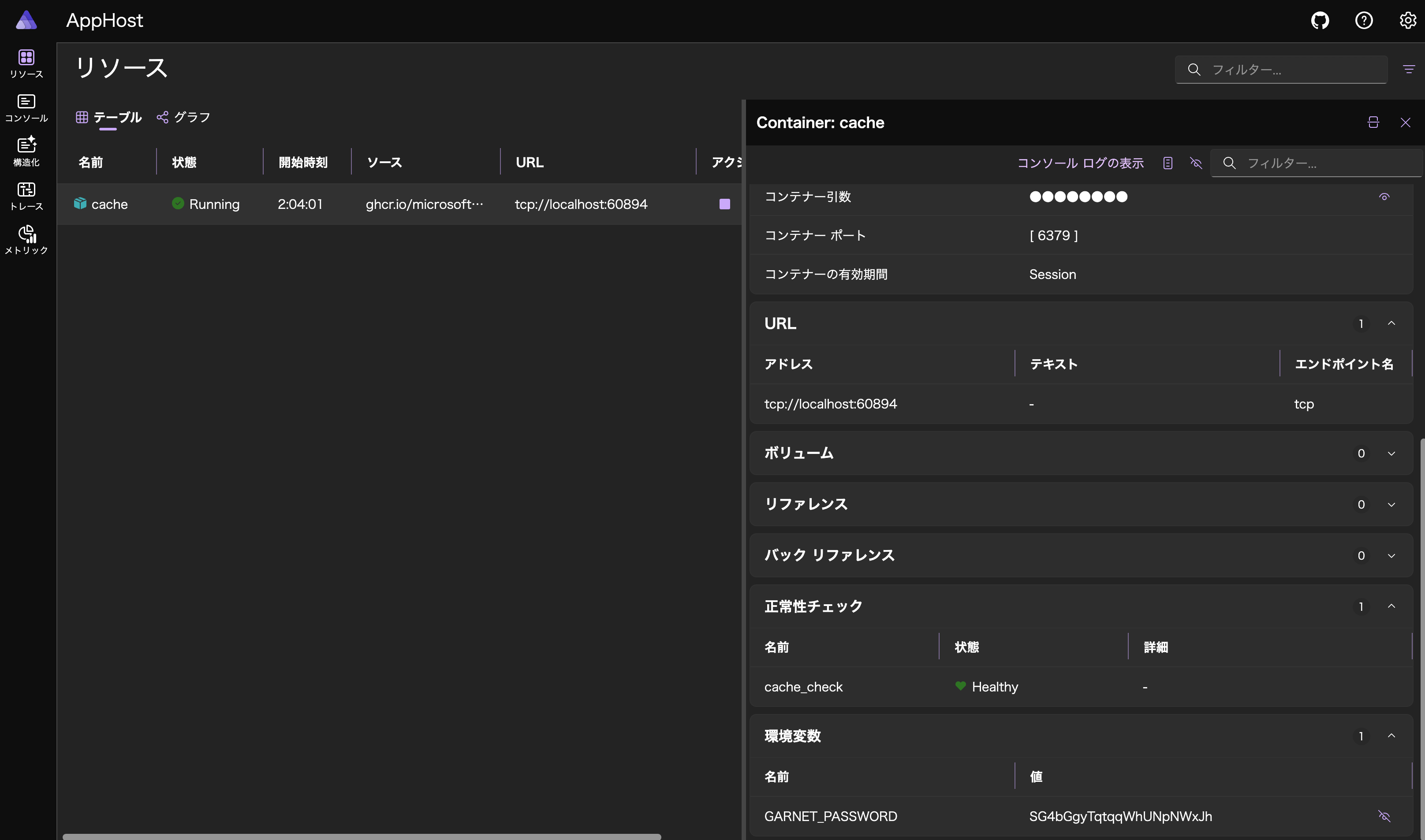
redis-cli を利用して接続する場合は以下のようなコマンドを実行します。
$ redis-cli -h localhost -p 60894 -a SG4bGgyTqtqqWhUNpNWxJh Server
Warning: Using a password with '-a' or '-u' option on the command line interface may not be safe.
localhost:60894> info Server
# Server
garnet_version:1.0.86
os:Unix 6.6.26.0
processor_count:12
arch_bits:64
uptime_in_seconds:459
uptime_in_days:0
monitor_task:disabled
monitor_freq:0
latency_monitor:disabled
run_id:a5f2217eb3d10716b3a1b36368eb1e22685beca6
redis_version:7.4.3
redis_mode:standalone
データバインドや永続化など、その他の設定は以下を参考するといいでしょう。
https://learn.microsoft.com/en-us/dotnet/aspire/caching/stackexchange-redis-integration?pivots=garnet&tabs=dotnet-cli
NuGet Package
Garnet を自前でカスタマイズしたい場合はこちら
コンソールアプリケーションを作成する
$ dotnet new console -o GarnetApp
パッケージを追加する
$ dotnet add package Microsoft.Garnet
起動する
$ dotnet run --project GarnetApp/GarnetApp.csproj
    _________
   /_||___||_\      Garnet 1.0.86 64 bit; standalone mode
   '. \   / .'      Listening on: 127.0.0.1:6379 and 1 more
     '.\ /.'        https://aka.ms/GetGarnet
       '.'

* Ready to accept connections
確認する
$ redis-cli info Server
# Server
garnet_version:1.0.86
os:Unix 15.4.1
processor_count:12
arch_bits:64
uptime_in_seconds:143
uptime_in_days:0
monitor_task:disabled
monitor_freq:0
latency_monitor:disabled
run_id:a2d2f4b41c1a185a460eb60aaf4ff58880872857
redis_version:7.4.3
redis_mode:standalone